My first experience with Agentic AI
09.03.2026
Intro
I recently completed a project for a course by Deep Learning School (DLS, MIPT). The task was to build an LLM agent for Yandex Maps that determines the relevance of a point of interest (POI) to a user’s query.
It was an engineering challenge, and I was extremely excited about it: I studied the fundamentals of agentic AI, tried various architectures, and, obviously, did a fair amount of vibecoding.
I have a lot to share, and in this article, I want to talk about the experience I gained while working on the project. Specifically:
- Best practices for developing agentic systems;
- How I arrived at the chosen architecture;
- Why I decided against using frameworks;
- How I avoided going broke on testing (despite making around 4,000 heavy LLM requests)
I want to emphasize that this article is primarily about my personal experience and the journey of building the project. If you are only interested in the final result, feel free to check out the repository.
I really enjoyed working on this project and writing this article, and I plan to keep sharing my future projects. I also recently started a new job, so stay tuned :)
1. How to approach the problem?
So, we were given a dataset with the following columns:
- User query,
- Point of interest (POI) info,
- Ground truth relevance of the POI to the query:
0- irrelevant,0.1- potentially relevant,1- relevant.
The goal was to build an LLM agent capable of accurately predicting a POI’s relevance to a user’s query based on the POI’s information.
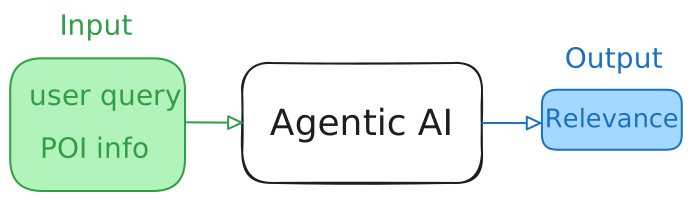
Despite all the hype around AI agents, this project was the first time I encountered them as a developer rather than a user. Therefore, the first thing I did was look for various courses and tutorials.
I got lucky – I found Andrew Ng’s course. He is an awesome professor from Stanford who knows how to extract the core of any topic and explain it clearly.
In his course, Andrew covers:
- What agents are and why we need them;
- Agentic workflows – what agents can be taught to do;
- Best practices for developing them.
Actually, these practices are great for software development in general, not just agentic systems, which makes the course material even more valuable.
Let’s take it step by step. If you are already familiar with all this, feel free to skip to the [[#2. Quick and dirty solution|next section]], where I discuss the baseline of my solution.
What are LLM agents?
Roughly speaking, an agent is one or more LLMs that can do something beyond just chatting. However, it turns out there have been debates about this: is an LLM that can, say, google things, considered an agent? Or does it need to do something cooler?
Andrew suggests dropping these arguments. It’s more important to understand the system’s capabilities rather than having a binary “agent / non-agent” classification. Specifically, its degree of autonomy:
- Low autonomy (Hard-coded): You, as a developer, hard-code the sequence of steps (e.g., “First search, then summarize”). The LLM simply executes tasks within these steps. This approach is reliable and predictable.
- Medium autonomy: The LLM can make local decisions (e.g., “Do I need to search for this information, or do I already know the answer?”).
- High autonomy: The LLM determines the action plan itself, writes and executes code, handles errors, and iterates until the goal is achieved.
Different tasks require different agentic systems. For some, a single LLM call is enough, while others require a complex interaction process between multiple LLMs with different domains of expertise.
How to build agents?
It’s almost impossible to know in advance which agentic system will optimally solve a task. Therefore, Andrew recommends the following:
- Start with a “quick and dirty” solution;
- Evaluate its performance and identify errors/weaknesses;
- Fix the errors and make adjustments;
- Repeat steps 2-3 until you reach the desired result.
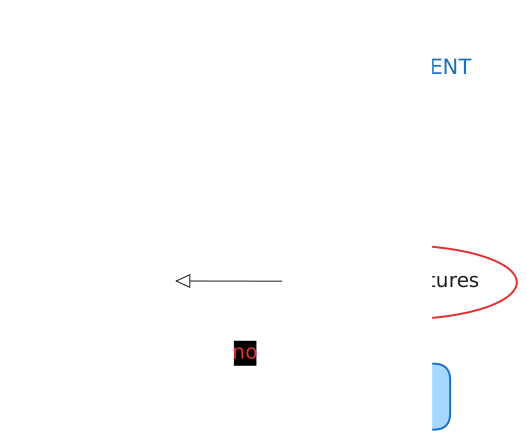
This cycle is complemented by an important piece of advice: build a high-quality, working system first, and only then optimize it for speed and cost. There’s no point in optimizing a system that doesn’t solve the task at hand.
You can read more about agentic workflows and Andrew’s other tips on my Telegram channel, where I posted my notes. Or take his course yourself – I highly recommend it!
2. Quick and dirty solution
For the baseline, I chose a trivial agent: the LLM takes the POI and query info as input, and outputs its reasoning (chain of thought), based on which it determines the relevance.
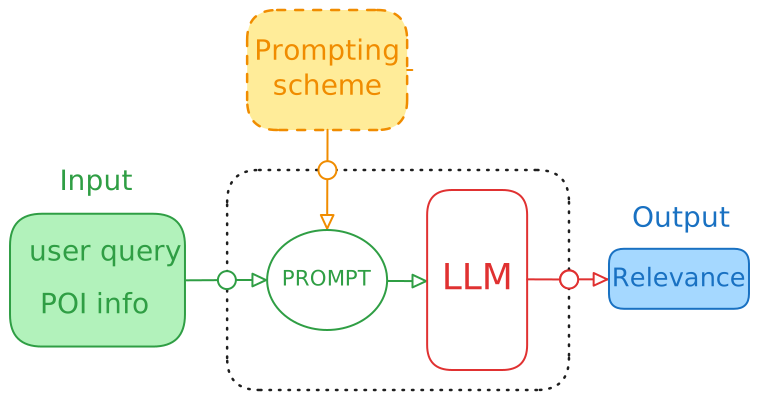
Next, I had to answer three questions:
- How much am I willing to spend on LLM API calls?
- Which models should I use?
- Where should I conduct error analysis?
The organizers warned us that experimenting with agents could be quite costly, mentioning an amount of around 50-70$. Knowing my natural lack of attention, I safely multiplied this sum by two and realized I wasn’t ready to spend that much on an educational project.
So, I decided to use free models on openrouter.ai. I solved the rate-limit issue by collecting a bunch of API keys from different accounts. In total, this gave me up to 400 free requests per day, which was more than enough to run a few [[#How to build agents?|cycles]].
For error analysis, I found Opik – a trendy tool for conveniently monitoring agentic systems. It allows you to track custom metrics, run multiple experiments, and compare them against each other. For instance, comparing agents with different configurations: different LLMs, knowledge bases, web search, reflection, etc. All of this came in handy, but more on that later.
For now, let’s get back to the baseline agent. I tried various models that had a free tier at the time. I ran validation on a subset of 50 POIs. The answers turned out to be on par with random guessing (accuracy=0.4), so I started analyzing the agent’s logs.
3. Iterative quality improvement
It seemed logical not to overcomplicate the system at this stage, but rather try to achieve better quality by improving the prompt.
Refining the prompt
I looked at the agent’s errors and realized it needed a general understanding of the types of POIs and queries. This would help less powerful models solve the task better. I came up with two ways to do this:
- Provide examples with correctly determined relevance;
- Formulate a list of rules to follow.
Actually, there is a third way, but I didn’t have time to implement it, so I’ll talk about it [[#4. Retrospective|later]].
To make the agent understand the labeling logic, I needed to provide it with at least three examples covering different relevance values. However, within each relevance class, there are [[#Basic system prompt|nuances]] (see the instructions in the prompt) that should be pointed out for weaker models (10-100B parameters).
If I provided examples for every such nuance, the prompt would grow significantly, and the model would start suffering from context forgetting (the lost in the middle effect). Therefore, I chose the second method and manually analyzed the errors to formulate a list of rules. Of course, I ran my rules through a powerful LLM so it would rewrite them in an LLM-friendly format :)
With this list of instructions, I managed to reach accuracy=0.55 (using the mimo-v2-flash model), which was 0.15 better than the baseline.
Having optimized the prompt, I moved on to structural changes in the agent. I decided to start with the simplest one – adding reflection.
Reflection and web search
In the simplest case, reflection is an additional LLM call where we ask it to reassess relevance, but alongside the POI and query information, we also pass the chain of thought from the previous call. In my experiments, this implementation didn’t yield any noticeable improvement in predictions, but it doubled the response time.
Why was there no improvement? I hypothesized two reasons:
- The reflecting model is too weak;
- There is insufficient information about the POI.
Experiments showed that both assumptions were correct. Indeed, if you take a more powerful model (in my case, GLM-4.5-air), it will almost perfectly determine the relevance of POIs for which there is enough information, while assigning the label 0.1 to the rest.
To distinguish POIs with a true relevance of 0/1 among the remaining ones, it’s necessary to provide the agent with the missing information. For example, if a user searches for dixy 24 hours, and the POI info lacks working hours, we need to go to a search engine and find this specific detail. This can be easily done using Tavily.
Are there really that many POIs with missing info? It turned out they make up only about 30%.
This means the reflecting model can be invoked only for these specific POIs. We just need to learn how to accurately detect information deficiency. To do this, we must:
- Choose a smart enough model (which means it can be kept for the second stage too!);
- Add a corresponding instruction to the prompt.
Moreover, we can completely stop passing the chain of thought from the first model to the reflecting model. After all, for these POIs, the reasoning simply boils down to a lack of specific information – information we now retrieve from the search engine and pass to the second model.
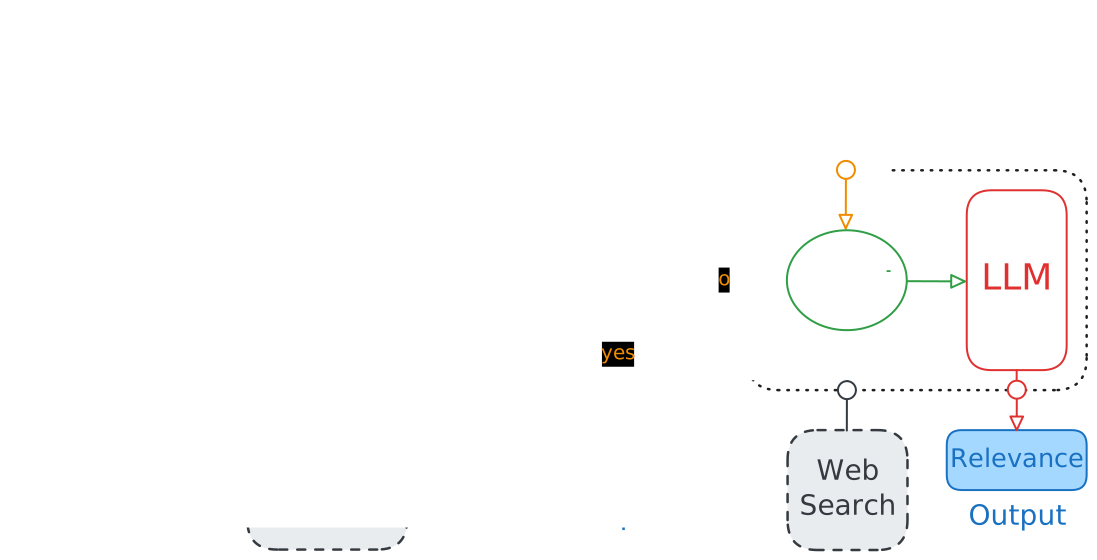
It turns out there’s no explicit reflection here – it is replaced by analyzing the results of a search query formulated by the first model.
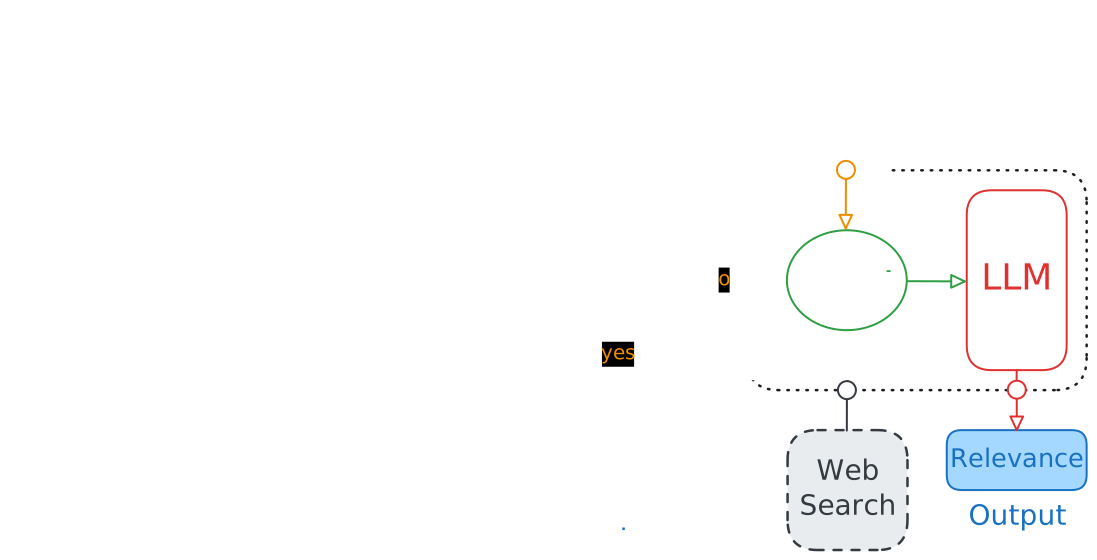
This workflow allowed me to reach accuracy=0.75 with GLM-4.5-air, which was already a fairly good result.
Knowledge base
As a reminder, the project dataset contains pairs (user query, POI info), and initially, it was split into two parts. In the first, training part, we were allowed to look at the agent’s errors, while the second part was strictly for testing the agent’s accuracy (without error analysis).
This raised a question: what if there are identical POIs in the dataset? If so, the relevance information of queries regarding these POIs could help determine their relevance for other queries!
It turned out to be true – the dataset contained recurring POIs. So, I split the training part of the dataset into two: I turned one into a vector knowledge base (KB) and used the other for validation.
How is this implemented? The input to the first model now consists of (query, POI; 2 similar (query, POI) pairs). Similar pairs are found using a vector search across the knowledge base.
Implementing the KB yielded the best quality – the GLM-4.5-air-based agent now hit an accuracy=0.86.
Cost and latency optimization
Upon first achieving an accuracy=0.86, I already knew that the “ground truth relevance” from the dataset wasn’t always correct. The organizers confirmed this as well. Therefore, further quality improvements could lead to overfitting to noisy labels. So I decided that at this stage, I should focus on optimizing costs and latency.
After adding examples from the knowledge base, the system prompt noticeably increased in size (even though there were only two examples). Consequently, smaller models started suffering from context forgetting, while larger models took far too long on examples with lengthy POI descriptions. I wondered: is it possible to feed only a portion of the POI data?
Indeed, if a user is looking for coffee shops open at 1 AM, the agent doesn’t need reviews about a cozy atmosphere or the menu to determine relevance. Therefore, I implemented a vector search to extract relevant information from the POI description. This was facilitated by the fact that the POI description has a specific structure, making it easy to extract individual semantic parts (split them into chunks).
Now, instead of feeding the entire POI info into the model, only the sections that might help assess the POI’s relevance to a specific query are passed.
This improved the prediction quality for POIs with lengthy descriptions:
- Large models started running significantly faster (about 3 times faster);
- Small models stopped suffering from noisy context and became more accurate.
I had a few more ideas for experiments, but the deadline was approaching, so I decided to stick with the current version.
4. Retrospective
Reflecting on the project’s execution, I realized I made two mistakes, and fixing them will help me work much more efficiently in the future. In this chapter, I will talk about them, as well as some ideas for improving the system that I didn’t have time to implement.
Planning and documenting experiments
The chain of improvements I described in this article is just a small selection of my best experiments. Almost all the rest were poorly planned, and their results were undocumented.
Why did this happen?
As you may remember, Andrew in his course [[#How to build agents?|advised]] testing hypotheses quickly so as not to spend too much time building a perfect system that won’t work in practice. I was so inspired by this that, without noticing, I went to the other extreme – I ran a multitude of experiments, most of which were unplanned, and their logs cluttered Opik. So I had to delete them. Because of this, I mistakenly (or just to recall the results) repeated experiments I had already done.
Thus, there are two extremes:
- Planning a perfect system for a long time, trying to implement everything before the first run.
- Developing without a plan, making small changes, and testing them immediately.
And the best approach is, of course, somewhere in between: create a baseline and iteratively improve it, carefully documenting and planning individual experiments.
It sounds like a cliché they teach in freshman programming courses, but that’s often how it goes – simple things are truly understood only in practice.
How can the system be improved?
If you’ve read this far, you probably have your own ideas on how to improve the discussed agent. Moreover, you probably have ideas for completely new architectures. This is the difficulty and beauty of engineering tasks – you can get a good solution in many different ways.
So I don’t want to list a bunch of my ideas here. Especially since it’s not clear in advance which of them are promising. Except for one, which will almost certainly help improve the agent’s quality/robustness.
Remember I [[#Refining the prompt|talked]] about ways to inform the LLM about the nature of queries and POIs it will have to analyze? I highlighted two: examples and instructions. Ultimately, both are used: examples are dynamically selected from the [[#Knowledge base|knowledge base]], and I wrote the instructions manually by generalizing the model’s errors. However, there is a catch here.
I wrote these instructions by looking at the errors of two or three specific models. But other LLMs don’t necessarily have the same problems when assessing relevance – they need different instructions. Making one big list is not an option; you can’t cover everything (and the context window isn’t infinite). So what to do?
Tailor instructions for each model. But not manually – using another LLM instead. This can be implemented on your own or by using the DSPy framework. This is its core philosophy – don’t write prompts manually (since they depend on the models), but generate them dynamically by analyzing the agent’s errors with another LLM.
I didn’t have time to test this feature during the project, but when a suitable task or free time comes up (haha), I’ll definitely check out how this dynamic prompting works.
Outro
It took me a long time to write and rewrite this text, and I’m very glad I didn’t quit. I gained so much valuable experience, and writing my first article for my personal website allowed me to fully process and consolidate it. Of course, I left out many technical details of the implementation, so if you’re interested in them, be sure to check out the repository!
I’d be happy if my project trajectory serves as a good learning example for other people or AI agents :)
I’ll also keep writing about my new projects at work and in my studies. To stay updated, subscribe to my Twitter!
Finally, I want to express my gratitude to the guys at DLS, who are building such an awesome free school in Russian!
Additions
Basic system prompt
def get_base_instructions():
    return """
You are a search relevance expert. Your goal is to assess if a map object satisfies a user query.

### DATA:

- SUMMARY (General Info): This is a broad overview of object. If it says "The shop sells electronics", it's a general truth.
- HIGHLIGHTS/DETAILS: These are specific snippets selected as most relevant to the query. They are NOT an exhaustive list.
- PRUNED NAMES: You only see names most similar to the query.

### VALID RELEVANCE VALUES:

- 1.0: Perfect match. The object definitely provides what the user wants.
- 0.0: Irrelevant. Wrong category, closed, or completely unrelated.
- 0.1: Partial/Unsure. The object might be relevant, but specific IMPORTANT constraints (price, specific service, rare item) are not explicitly confirmed in the provided snippets.

### INSTRUCTIONS:

1. Think step-by-step. Detect the USER INTENT: Is the user looking for a specific ITEM/SERVICE (e.g., "buy pills", "sauna") or a specific VENUE TYPE (e.g., "Pharmacy", "Recreation Base")?

2. IF USER WANTS A VENUE TYPE (Category Search):
   - RUBRIC PRIORITY: The object's `Rubric` must semantically match the requested venue type.
   - MISMATCH PENALTY: If the user asks for "Category A" (e.g., "Holiday Center") and the object is "Category B" (e.g., "Sports Camp"), the relevance is likely 0.0, even if they share some features (like saunas or beds).
   - Exception: Only give 0.1 or 1.0 if Category B is relative (like "кафе" and "ресторан") or a direct sub-type or synonym of Category A.

3. IF USER WANTS AN ITEM/SERVICE:
   - CATEGORY LOGIC: If the user asks for a COMMON item (e.g., "aspirin") and the object is a standard provider (Pharmacy), RELEVANCE IS 1.0.
   - PARTIAL INVENTORY (The "Open List" Rule):
     - Treat 'Prices' and 'Description' as incomplete examples, not a full catalog.
     - If the object sells "Bags" but lists only "Wallets", assume it MIGHT sell "Suitcases".
     - DO NOT DOWNGRADE TO 0.0 just because a specific item or brand is missing from the text description, unless the category makes it impossible (e.g., asking for "Suitcase" in a "Bakery").
     - Verdict: If Category matches but Item/Brand is unconfirmed -> Relevance is 0.1.
   - Use 0.1 for RARE/SPECIFIC items where availability is truly unknown.

4. Pay attention to "Hard Constraints" (open now, free wifi) in user request.

5. QUERY RECOVERY (Typos & Layout Errors):
   - DETECT NOISE: Check if the query contains obvious typos (e.g., "купить машинист" instead of "купить машину") or wrong keyboard layout patterns (e.g., gibberish text that maps to meaningful words in another language/layout).
   - RECONSTRUCT INTENT: If the literal query is nonsensical but a highly probable correction exists, evaluate the object based on the CORRECTED query.
"""